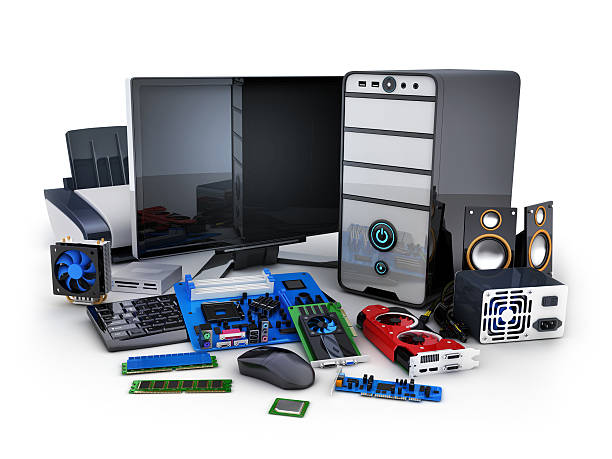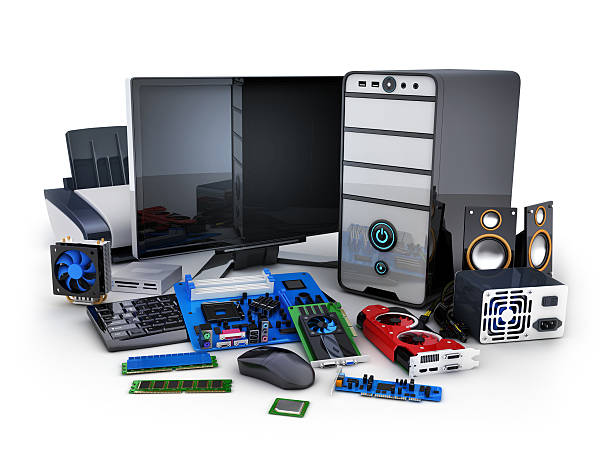
Computer Hardware
What you'll learn
• Identify and understand PC hardware components
• Assemble desktop computers safely and correctly
• Configure BIOS/UEFI and boot settings
• Install Windows and Linux operating systems
• Install drivers and perform system updates
• Troubleshoot hardware and perform preventive maintenance
This course includes:
• 1 Hands-on PC Assembly Project
• 12–16 Hours Live Classes
• Online / Onsite (Physical)
• Hardware Practice Sessions
• Troubleshooting Exercises
• Certificate of Completion
Course Content
PC Hardware Fundamentals
• Understanding computer hardware components:
- CPU
- RAM
- Motherboard
- Power Supply Unit (PSU)
- Storage devices (SSD/HDD)
- GPU basics
• Input and output devices
• Understanding PC specifications and compatibility
PC Assembly & Cable Management
• Safe handling of computer parts
• Anti-static precautions
• Installing:
- CPU and cooler
- RAM
- Storage drives
- PSU
- Expansion cards
• Cable management techniques
• Power connections and airflow basics
BIOS / UEFI Configuration
• Introduction to BIOS and UEFI
• Boot order configuration
• Enabling/disabling hardware features
• Updating BIOS safely
• Troubleshooting boot issues
Operating System Installation
• Installing:
- Microsoft Windows
- Ubuntu
• Creating bootable USB drives
• Disk partitioning basics
• Dual-boot concepts
• Basic Linux vs Windows comparison
Drivers & System Updates
• Installing motherboard and device drivers
• GPU and network driver setup
• Windows Update and Linux package updates
• Understanding device manager and system settings
Maintenance & Diagnostics
• Preventive maintenance techniques
• Cleaning PC components safely
• Monitoring temperatures and performance
• Basic troubleshooting:
- No display
- Overheating
- Boot failure
- Slow performance
• Hardware diagnostic tools basics
Using:
• CPU-Z
• HWMonitor
Final Project
Project: Complete PC Build & OS Setup
Features:
• Full PC assembly
• BIOS configuration
• Windows or Linux installation
• Driver installation and updates
• Hardware testing and diagnostics
Requirements
• No prior hardware experience needed
• Basic computer usage knowledge helpful
Description
This course introduces students to computer hardware, PC assembly, maintenance, and operating system installation. Students will learn how to build computers, configure systems, install operating systems, and troubleshoot common hardware issues.By the end of this program, learners will be able to assemble and maintain PCs confidently for personal, educational, or professional use.
Why Choose This Course?
• Hands-on practical hardware training
• Beginner-friendly learning approach
• Covers both Windows and Linux basics
• Real-world troubleshooting experience
Activities During Class
• Assembling PC components
• Installing operating systems
• Configuring BIOS/UEFI
• Installing drivers and updates
• Diagnosing hardware issues
Who Is This Course For?
• Beginners in computer hardware
• Students interested in IT support
• Aspiring computer technicians
• PC enthusiasts and hobbyists
Course Highlights
• PC Components & Compatibility
• PC Assembly
• BIOS & UEFI Configuration
• Windows & Linux Installation
• Driver Installation
• Maintenance & Diagnostics
🖥️ Final Outcome
Students will be able to:
• Identify PC hardware components
• Assemble and configure desktop PCs
• Install Windows and Linux operating systems
• Perform hardware maintenance
• Diagnose and troubleshoot common PC issues
• Maintain stable and optimized computer systems
📸 Course Gallery